
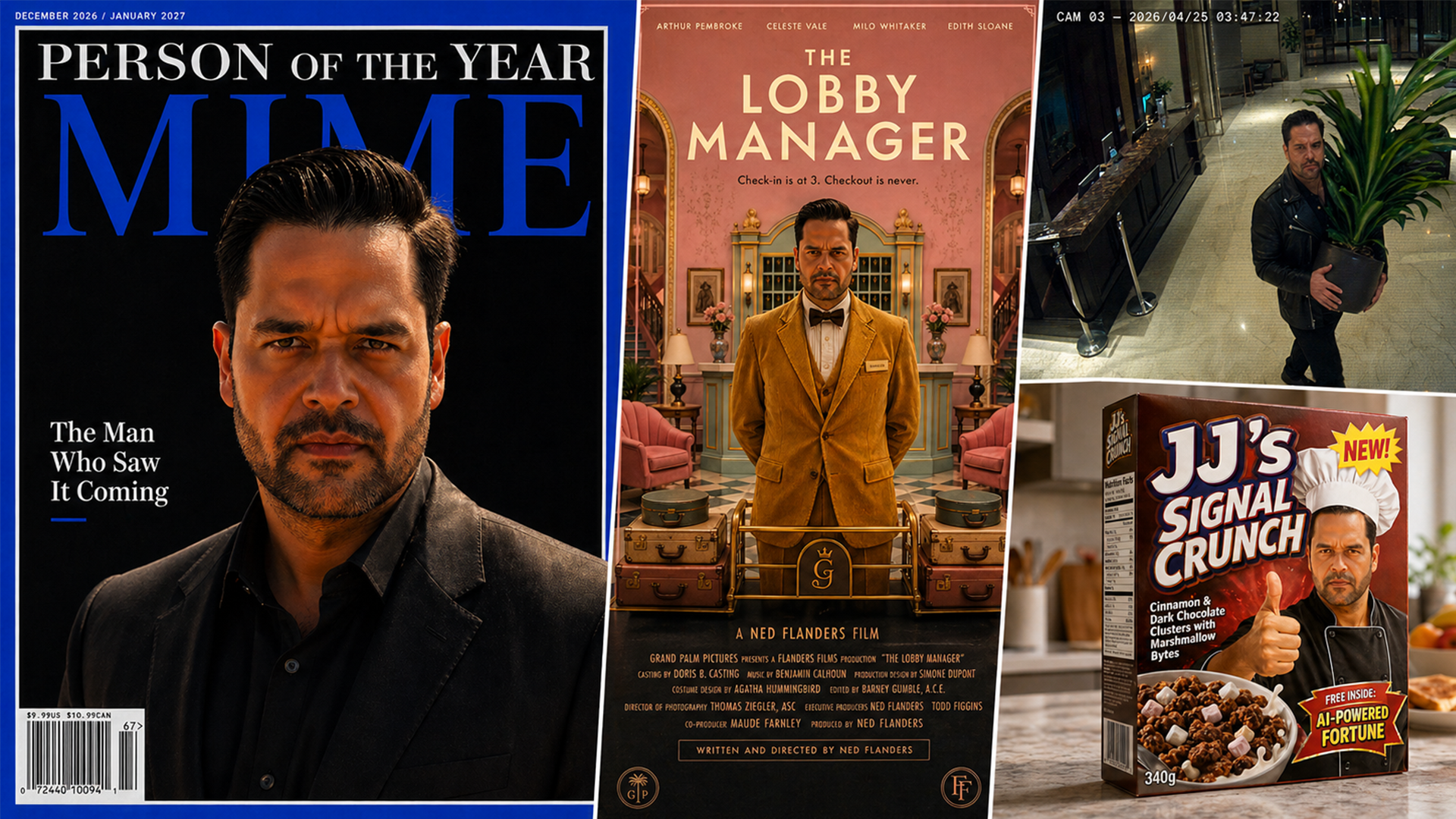
I spent an entire Saturday asking ChatGPT to put me on a magazine cover, redesign a bedroom, roast my fashion choices, and cast me in a Bollywood blockbuster.
The results were genuinely unsettling. Not because they were bad. Because they were good.
If you’ve been using ChatGPT Images to create the occasional social media graphic or headshot, you’re barely scratching the surface. This thing can do stuff that would have cost thousands of dollars, multiple professionals, and weeks of work just a couple of years ago.
I tested ten of the most surprising capabilities I could find, documented every prompt, and compiled the results. Some of these made me laugh. Some made me slightly uncomfortable. All of them made me rethink what’s possible with a well-written prompt and a bit of imagination.
Here are ten things I genuinely didn’t think it could do, with the exact prompts so you can try them yourself. Just upload a photo of yourself (or anyone, with their permission) and paste the prompt. Tweak as needed. Go wild.
One thing to be upfront about: I deliberately used an AI-generated version of myself throughout this post rather than my real photo. A slightly hunkier, Mad Max-inspired alter ego, because if you’re going to experiment with AI-generated images of yourself, keeping a clear line between your real identity and AI playtime feels like the responsible move. It’s also just more fun this way. Every image you see below is entirely AI-generated, both input and output. Nothing real was harmed in the making of this blog post.
1. One Photo, Seven Realities
This is the one that made me realise the game has changed.
Take a single photo and ask ChatGPT to render it across completely different photographic formats. Not filters. Not presets. Entirely different realities. A faded Polaroid from 1983. A newspaper front page. A passport photo strip. A laptop on a Zoom call. A vintage Parisian postcard. Security camera footage. Even a Reddit post.
Same face. Seven completely different worlds.

The security camera one caught me off guard. There I am at 3:47am, carrying a suspicious houseplant through a hotel lobby. The Reddit post was almost too convincing, complete with 14.3k upvotes and a top comment reading: “Plot twist: he’s just looking at his own reflection in the screen.”
Tip: The more specific you are about physical details (creases, coffee stains, lighting, wear and tear), the more convincing the result. ChatGPT responds incredibly well to environmental context. Don’t just ask for “a newspaper.” Ask for a newspaper lying on a kitchen table with morning light. The scene sells the illusion.
2. Your 15 Minutes Start Now
One magazine cover is cool. A full celebrity career arc in four images is content.
I asked ChatGPT to build my entire rise-and-fall narrative: MIME Person of the Year (“The Man Who Saw It Coming”), a paparazzi shot outside a restaurant (sunglasses at night, naturally), the inevitable meme (me distracted by “one more prompt” while actual work watches in disappointment), and the “Where Are They Now?” tabloid feature where I’ve gone off-grid and now talk exclusively to AI chatbots.

The tabloid page is my personal favourite. It includes a pull quote: “I quit the noise. The bots were better listeners anyway.” There’s also an ad for anti-aging night cream, because of course there is.
Tip: For the full career arc effect, do each image separately and then ask ChatGPT to arrange them in a 2×2 grid with labels (“1. TRIUMPH”, “2. PEAK FAME”, “3. INTERNET OBSESSION”, “4. OFF-GRID FINALE”). It handles composite layouts surprisingly well. You can even ask it to add a cinematic title bar at the bottom.
3. Be Your Own Director
This might be the most fun I had all day.
I created a movie poster for a sci-fi epic called “THE LAST SIGNAL” (tagline: “Some messages were never meant to be answered”), then asked ChatGPT to reimagine the exact same film across four completely different genres. The sci-fi original. A pastel-drenched symmetrical hotel comedy (“THE LOBBY MANAGER,” tagline: “Check-in is at 3. Checkout is never.”). A psychological horror version with the same title but a creepy hotel corridor. And a full Bollywood blockbuster, complete with Hindi script, explosions, mountains, and a 2027 release date.

The pastel hotel comedy nailed the aesthetic. Mustard corduroy suit, perfect symmetry, pastel pink lobby. The Bollywood poster went harder than I expected and I’m here for it.
Tip: Genre-hopping works because it forces the AI to demonstrate stylistic range with the same subject matter. Try describing specific visual styles rather than naming directors (e.g. “symmetrical pastel comedy” or “high-contrast noir thriller”). You get the aesthetic without the copyright grey area, and the further apart the styles, the more impressive the result.
4. Brand You: An Empire Nobody Asked For
What started as “make me a cereal box” escalated into a full fictional brand universe. Because once you see JJ’s Signal Crunch (“Cinnamon & Dark Chocolate Clusters with Marshmallow Bytes”) looking genuinely real on a kitchen counter, you can’t stop.
So I kept going. A Signal Energy drink (Midnight Focus, Zero Sugar, “Stay Curious. Stay Wired.”). A Maison JJ luxury hotel amenity kit with a sleep mask that reads “DO NOT DISTURB — GENIUS AT WORK” (I cringed typing that, but the AI delivered it with zero irony, which somehow makes it funnier). And the piece that broke me: a Signal Air airline safety card where every single illustrated passenger is me. Fastening the seatbelt? Me. Deploying the oxygen mask? Also me. Brace position? Still me.

Hotels. Energy. Cereal. Airlines. Nobody asked for any of this. I regret nothing.
Tip: Product mockups work best when you include the environmental context. Don’t just generate a cereal box floating in space. Put it on a kitchen counter with a blurred breakfast scene behind it. The context is what makes people do a double-take and think “wait, is that real?”
5. The AI That Told Me I Was Dressing Wrong
This one requires a small amount of courage.
Upload a photo of yourself and ask ChatGPT to act as an elite celebrity stylist. Not a polite one. An honest one. Ask it to assess what you’re currently wearing, then generate four alternative outfits: The Upgrade (same vibe, better execution), Date Night, The Power Move, and Off Duty Cool.

It gets better. I also asked for a colour analysis. Turns out deep teal is apparently my best colour, pale dusty beige is actively working against me (noted), and plum is a “surprising winner” I’d probably never pick on my own. Each panel includes a colour swatch.

Now, I’ll be honest. These recommendations are AI-generated and should be taken with a healthy pinch of salt. A real stylist would factor in body language, fabric texture, personal comfort, and a hundred other things no algorithm can see. But as a starting point for thinking about what works and what doesn’t? Surprisingly useful. And definitely entertaining.
Tip: You can go deeper by asking for specific occasions (“what should I wear to a wedding in Tuscany?”), specific budgets (“style me using only high street brands”), or even specific decades (“dress me like it’s 1973”). The more contextual your constraint, the more interesting the output.
6. Your Own Interior Designer (For Free)
Take a room. Any room. Give ChatGPT specific, real-world functional constraints, the kind actual humans actually have, and watch it generate multiple design directions from the same starting point.
I started by generating a “before” shot: a generic spare bedroom with magnolia walls, mismatched bedding, cables everywhere, and an old office chair that’s clearly given up. Then I gave it my brief: this room needs to work as a home office for 8 hours of video calls, a guest bedroom, AND a space that doesn’t make me want to crawl back under the covers at 7am on a Monday. Oh, and my imaginary partner hates grey and “that generic Scandi look that every influencer has.”
Four design directions came back: Warm Modern, Japanese Minimal, Mid-Century Creative, and Cosy Library.

All four kept the room dimensions and window position consistent. All four looked like something you’d see on an interior design blog. Total cost of the consultation: zero. Time taken: about two minutes.
Now obviously, this isn’t a substitute for a qualified interior designer who understands structural constraints, lighting, materials, and your actual lifestyle. But as a way to quickly explore what’s possible and land on a direction before spending real money? It’s remarkable.
Tip: The more specific and personal your constraints, the better the results. “Make it look nice” gives you generic output. “I need a room that works for video calls, has space for a pull-out guest bed, and makes me feel like a competent adult when I walk in at 7am” gives you something you’d actually want to live in.
7. Survival Guides Nobody Asked For
This is where ChatGPT’s illustration capabilities really surprised me.
I asked it to create two detailed infographics. The first: “A Field Guide to Coffee Shop Laptop Users.” A full taxonomic study of the modern cafe ecosystem, complete with species classifications, habitat notes, danger levels, and distinguishing features.

It identified six species: The Territorial Spreader (one espresso, six-person table, four hours), The Call Bomber (speakerphone, no shame), The Fake Worker (screen shows Netflix, expression suggests solving world hunger), The Plug Hunter (4% battery, supernatural peripheral vision), The Meeting Martyr (seventh video call, cafe activity leaking into background), and The Digital Nomad (ring light deployed, Instagram caption already drafted).
Published by the International Society for Coffee Shop Anthropology. Obviously.
Then I asked for something genuinely useful: The Ultimate Carry-On Packing Guide. One Bag, 10 Days. A clean, beautiful flat-lay infographic showing exactly how to fit everything you need into a 45x36x20cm carry-on. Merino wool t-shirts (3 days between washes, no smell), a packable rain jacket, convertible trousers, one charging cable with multi-heads, and a solid shampoo bar.

The closing line: “You don’t need checked baggage. You need better choices.”
The contrast between the two demonstrates range. One is pure comedy (and highly shareable). The other is genuinely practical (and highly saveable). Both look like they were designed by a professional.
Tip: Infographic-style prompts work best when you give ChatGPT the full structure: title, subsections, specific data points, visual style reference, and even the footer text. Think of it like briefing a designer. The more complete your brief, the more polished the result.
8. Your Life Story, Graphic Novel Edition
Everyone has a story they wish they could illustrate. A travel disaster. A parenting moment. That time you stayed up until 3am doing something completely unnecessary.
I went with the latter. “THE PROMPT THAT BROKE ME” — a four-panel comic about the inevitable spiral of late-night AI image generation. Panel 1: “Just one more prompt and I’ll go to bed…” Panel 2: Intense typing, clock showing 1am, a mug reading “PROMPT SLEEP REPEAT.” Panel 3: Partner appears in the doorway. “It’s 3 AM.” “You don’t understand — I almost got it to generate a perfect hand.” Panel 4: Asleep on the keyboard. Screen reads “I’m sorry, I can’t generate that image.” The cat judges silently.

Then I tested style range by rendering the same scene across four comic art styles: Manga (complete with Japanese onomatopoeia for keyboard tapping), Marvel/DC Superhero (somehow I look like I could bench-press the laptop), Franco-Belgian (clean Tintin-style linework), and Noir/Sin City (high-contrast black and white, coffee steam replacing cigarette smoke).

Same character, same scene, four completely different artistic worlds.
A word of honesty here: multi-panel consistency is still one of ChatGPT’s trickier areas. Characters can drift between panels, and you might need a couple of attempts to get the continuity right. But when it works (and it frequently does), the results are genuinely impressive. And the fact that a few attempts is all it takes to create a professional-looking comic from a text description is still kind of mind-blowing.
Tip: For consistent characters across panels, include a detailed description of the character’s appearance in your prompt (or better yet, attach a reference photo). Mentioning “consistent character design across all panels” explicitly helps. If a panel drifts, you can regenerate just that panel and ask ChatGPT to match the style of the others.
9. The Shot That Shouldn’t Exist
This one might be the biggest surprise on the list. Most people have no idea ChatGPT can generate 360-degree equirectangular images.
When you view the image flat, it looks warped and stretched. That’s because it’s a projection of a sphere onto a flat rectangle, like a world map. But load it into a 360° viewer and suddenly you’re standing inside the scene, looking around in every direction.
I asked for the bridge of a futuristic starship. The Expanse meets Star Trek. Holographic displays floating in mid-air, a massive curved viewport showing a purple nebula, crew stations lining the periphery, and a captain’s chair behind you. The geek in me was quietly delighted.

How to view it in 360°:
Save the image to your phone and open it in any free 360° photo viewer app (“Panorama 360” on iOS, “Photo Sphere Viewer” on Android, or Google Street View all work). Move your phone around and the image wraps around you as if you’re standing inside the scene. On desktop, you can upload it to pannellum.org or Facebook, which auto-detects equirectangular images.
Tip: Equirectangular images can be hit-or-miss. The key phrase is “the aspect ratio MUST be exactly 2:1” and explicitly mentioning “equirectangular projection.” If the first attempt doesn’t wrap properly in a viewer, try again. When it works, it’s genuinely magical. When it doesn’t, you get an interesting panorama that simply doesn’t loop cleanly. Budget two or three attempts for this one.
10. Everything, Everywhere, in One Frame
I saved the most visually jaw-dropping one for last.
The concept: cram an entire decade, culture, or concept into a single photorealistic photograph. Not a collage. Not a grid. One coherent image with impossible density. The kind of image you zoom into, keep finding new details, and end up sending to three friends.
I tested three: Everything 1980s, Everything Japan, and Everything AI in 2026.
Everything 1980s packed a suburban living room with a CRT showing static, VHS tapes, a boombox, a Rubik’s cube, a rotary phone, wood-panelled walls, a lava lamp, Ray-Ban Wayfarers, a skateboard, a Walkman with orange foam headphones, a can of Tab cola, a Polaroid camera, roller skates, an arcade cabinet, a Members Only jacket, and a beige computer with a green-screen monitor. The warm, golden light through venetian blinds ties it all together.

Everything Japan compressed past, present, and future into a single Tokyo alley at golden hour. Traditional roof tiles next to neon signs. A torii gate at the end of the street. A woman in a kimono walking past someone in Harajuku street fashion. Cherry blossoms drifting through the air. A vending machine. A ramen shop. A bullet train visible through a gap between buildings. Mount Fuji on the horizon. Matcha on a counter in the foreground.

Everything AI in 2026 captured the beautiful chaos of this exact moment: multiple screens showing different AI interfaces, a whiteboard reading “IS THIS AGI?” with an arrow pointing to the coffee machine, sticky notes reading “PROMPT ENGINEERING IS NOT A CAREER” next to “YES IT IS”, a GPU server rack with a spinning electricity meter, an “Emotional Support for AI Engineers” vest on a dog, and a newspaper headline about governments racing to regulate AI.

These images reward exploration. Zoom in. Find the details. Argue about what’s missing. That’s the whole point. It’s interactive content disguised as a static image.
Tip: These “everything” images work best with three ingredients: (1) a grounded, realistic setting (a room, a street, a desk) rather than an abstract collage, (2) extremely specific object references rather than vague categories, and (3) a lighting description that unifies the whole scene. Try it with your own decade, your own city, your own industry. “Everything that represents [your profession] in one photograph” is a guaranteed conversation starter.
A Few Things I Learned Along the Way
Start with one strong reference photo. I used the same AI-generated image of myself throughout, and it gave the whole project visual consistency. If you’re using a real photo, pick one with clear lighting and a visible face. The AI needs to see you clearly to render you convincingly.
Be ridiculously specific in your prompts. “Make a magazine cover” gives you something generic. “A MIME Magazine cover with the navy blue border, December 2026 date, barcode, a cover line reading ‘The Man Who Saw It Coming’, dramatic cinematic lighting against a dark background” gives you something people will zoom in on. The specificity is the secret.
Environmental context sells the illusion. A cereal box on its own looks like clip art. A cereal box on a kitchen counter with morning light and a blurred breakfast scene behind it looks real. Always describe the scene, not just the object.
Expect iteration. Not every prompt lands on the first try. The comic panels sometimes drift in character consistency. The equirectangular image might not wrap perfectly. The text on the newspaper might be slightly garbled. That’s normal. Budget 2-3 attempts for anything complex. The iteration is part of the creative process, not a bug.
Screenshot your prompts. If you’re planning to share your results (and you will), showing the actual prompt alongside the output adds credibility and helps others replicate what you’ve done.
A Note on Responsible Use
With capability comes responsibility. A few things worth keeping in mind:
Always use your own likeness or get explicit permission. The fact that ChatGPT can put anyone’s face on a magazine cover, in a movie poster, or in a meme format is impressive. It’s also a power that should be used thoughtfully. Don’t create images of other people without their clear, informed consent.
Be thoughtful with real brand names and logos. I referenced recognisable formats in this post for educational and experimental purposes, and everything is clearly identified as AI-generated. That context matters. Where I created product brands, I kept them fictional (Signal Air, Maison JJ, The Daily Chronicle). The line to watch: don’t create images using real brands in ways that could genuinely mislead people or damage reputations. If it could be mistaken for real, make sure it’s obviously labelled as AI-generated. Context and transparency are everything.
Label your AI-generated images. Whether you’re posting on social media or sharing with friends, be transparent that these are AI-generated. It builds trust, avoids confusion, and frankly, the fact that AI made these is part of what makes them impressive. Don’t hide it. Lead with it.
Be mindful of cultural sensitivity. The “Everything Japan” image, for example, compresses an entire culture into a single frame. It’s meant to be a love letter, not a caricature. When representing cultures, places, or communities, approach with respect and awareness.
Remember that AI image generation has biases. The fashion recommendations, colour analysis, and interior design suggestions are generated by a model, not a qualified human professional. Take them as creative inspiration, not definitive advice.
The Prompts Are the Product
Here’s what struck me most after a full day of experimenting.
The gap between “I typed a sentence and got a generic picture” and “I wrote a detailed creative brief and got something that looks like it cost thousands to produce” is enormous. And the only thing separating the two is the quality of the prompt.
That’s what this post is really about. Not just what ChatGPT Images 2.0 can do, but the fact that the skill of describing what you want, clearly and specifically, is becoming one of the most valuable creative skills going. You don’t need Photoshop. You don’t need a design degree. You need the ability to articulate a vision in words.
I started this experiment thinking I’d find a few fun tricks. I ended it thinking about how many creative projects, from product prototyping to interior design to personal branding to comic books, just became accessible to anyone with curiosity and a well-crafted prompt.
The tools are here. The prompts are above. The only question is what you’ll make with them.
Now if you’ll excuse me, I have a fictional airline to run.
Discover more from Hotelemarketer by Jitendra Jain (JJ)
Subscribe to get the latest posts sent to your email.
0 comments on “10 Things I Didn’t Think ChatGPT Images 2.0 Could Do (With the Exact Prompts I Used)”